
Zulfaa

ZULFAA

Updates

What has changed in ZULFAA, told the way you would notice it rather than the way it was built. Every release stays here.

Update 2 1.2.0

Update 2 1.2.0 (proposed) Not released yet

The Qur'an, read the way you actually read

A full review of the Qur'an experience and three batches of fixes from it: your place is kept only when you have really read, a surah is finished only when its last verse has really been heard, every surah is reachable with the player open, the player follows you to every tab, and the whole reader works with a screen reader.

No date set This update has not been built or distributed. Nothing below is on anyone's phone yet.

In this update

  • Browsing a surah does not count as reading it
  • Pause a recitation from anywhere
  • Every surah is reachable while a recitation plays
  • The Qur'an can be used with a screen reader and a keyboard
  • A surah is finished when its last verse has actually been heard

Qur'an

What the review found, and what is fixed

The reader, the player, the sheets and the list were checked end to end, on the device. These are the fixes that have been made and verified so far; the review's remaining items are still open and are not listed here.

  1. Browsing a surah does not count as reading itOpening a surah and backing out no longer overwrites your place.
  2. Every surah is reachable while a recitation playsWith the player showing, the list used to end at Al-Ikhlāṣ — Al-Falaq and An-Nās sat under the bar.
  3. The Qur'an can be used with a screen reader and a keyboardEvery verse is now a named control that opens its actions, and every surah can be reached and opened without touch.
View all Qur'an changes (18)Hide the full list
  1. Improved
    The Qur'an can be used with a screen reader and a keyboard

    Every verse is now a named control that opens its actions, and every surah can be reached and opened without touch. The reader has a proper heading, and play/pause announces itself in your language.

  2. Improved
    Continue reading names the juz

    The card now shows which of the thirty parts your position is in, using the same boundaries as the Juz tab.

  3. Improved
    The tafsir sheet works fully with a keyboard and screen reader

    Focus moves into it when it opens, stays inside while it is open, Escape closes it, and focus returns to the verse you came from. Every sheet in the app now behaves this way.

  4. Improved
    Save controls say what they save

    The bookmark at the top of the reader announces itself as the surah bookmark and whether it is set; the verse menu's save row announces save verse or remove verse. The two used to share the one word “Save”.

  5. Improved
    Pause a recitation from anywhere

    The player had controls on the Qur'an tab only; leave for Home, Prayer, Qibla or Profile and the recitation followed you, audible and untouchable. The bar now follows you to every tab and page, with the same play, pause, previous, next and stop. It steps aside only where the navigation bar does.

  6. Fixed
    Browsing a surah does not count as reading it

    Opening a surah and backing out no longer overwrites your place. A position is saved once you have moved through the text, and a surah counts as finished only when you have read to its end — short surahs are no longer marked read the moment they open. Earlier saved positions carry over.

  7. Fixed
    Every surah is reachable while a recitation plays

    With the player showing, the list used to end at Al-Ikhlāṣ — Al-Falaq and An-Nās sat under the bar. The list now leaves exactly the room the bar needs, expanded or collapsed.

  8. Fixed
    Nothing hides behind the player, and nothing floats above a gap

    In the reader, the last lines of a surah cleared the bar by too little when it was expanded and by far too much when collapsed. The space is now measured from the bar itself, in every state.

  9. Fixed
    Translation shows when it says it is on

    Translation could be switched on while the flowing mushaf view showed none of it. Turning off verse-by-verse view now turns translation off with it, and the credit line appears only above a translation that is actually there.

  10. Fixed
    The tafsir's source is readable

    The line naming the tafsir and its author sat half under the Android navigation bar. It now sits clear of it.

  11. Fixed
    “Repeat this verse” repeats that verse

    It used to set repeat to unlimited for the rest of the session, so every later verse looped until you noticed. It now applies to the verse you asked for, shows as on in the verse menu, and restores your previous setting when playback moves on. A second tap ends it.

  12. Fixed
    The player says so when something else pauses it

    A call or another app taking over the audio left the player showing a pause button over silence. It now shows play the moment playback is interrupted.

  13. Fixed
    Your profile names the verse properly in English and Dutch

    The verse reference used to split, with the number stranded on its own line beside the Arabic. It now stays together.

  14. Fixed
    Reading History opens a finished surah from the start

    Opening a finished surah from your history used to land on its last verse. It now opens from the start, like everywhere else.

  15. Fixed
    The player says straight away when there is no connection

    Starting a recitation with no network used to spin for over half a minute before admitting it could not play. It now tells you at once, with the same message and the same Retry. Reading is unaffected — the text is on your phone.

  16. Fixed
    A surah is finished when its last verse has actually been heard

    Starting the final verse used to mark the surah complete at once, so pressing next onto the last verse and leaving counted as having heard it. Completion is now recorded when the recitation reaches the end of that verse — every repeat included — and not before. Reading progress is unchanged.

  17. Fixed
    Nothing hides behind the player on a short page

    A single search result, or a Favorites list with one surah, sat under the player bar with no way to scroll it out. Every page now leaves exactly enough room to scroll such rows clear of the bar; nothing changes when no recitation is loaded.

Worth knowing

How it behaves

Seeing a verse is not reading it

ZULFAA records a reading position only once you have moved through the text, and marks a surah finished only when you have read your way to its end. A short surah that fits on one screen is therefore not marked read just by opening it; a recitation played to the last verse still finishes it. Positions saved by earlier versions carry over unchanged.

Still being written

Named here so its absence is visible rather than accidental.

This release is still being built

The Qur'an review found more than the three batches above fixed. What remains is design and product decisions rather than defects, and will be added here only when it is finished and verified — nothing about it is written down yet. This version is not on anyone's device.
Update 1 1.1.0 (proposed) Not released yet

Umrah, Ramadan, and a quieter app

Two new places to keep — Umrah Savings and the Ramadan Planner — alongside a long list of corrections across the start page, the prayer times and the app's own furniture.

No date set This update has not been built or distributed. Nothing below is on anyone's phone yet.

In this update

  • Umrah Savings
  • The Ramadan Planner
  • A dark appearance, and one that follows your phone
  • Every prayer row shows what it will actually do
  • Reading counts as reading

Qur'an

The Qur'an, read the way you actually read

Reading now counts as reading: your place is kept whether or not a reciter is playing, and a surah you finished stops offering to continue. The fuller review of the Qur'an experience came after this release was frozen and is in 1.2.0.

  1. Reading counts as readingYour place was only ever saved while recitation played, so silent readers never got Continue reading.
  2. The Qur'an tile says which of its two things it will doWith a saved reading position the tile reads Continue; with none it is the plain way into the Qur'an.
  3. A finished surah stops offering to continueReaching the last ayah used to leave every Continue pointing at it.
Read these in fullHide the full list
  1. Improved
    The Qur'an tile says which of its two things it will do

    With a saved reading position the tile reads Continue; with none it is the plain way into the Qur'an. It always did two different things — now it says which.

  2. Fixed
    Reading counts as reading

    Your place was only ever saved while recitation played, so silent readers never got Continue reading. Scrolling through a surah now saves where you are — on the start page, the Qur'an tab and in the reader.

  3. Fixed
    A finished surah stops offering to continue

    Reaching the last ayah used to leave every Continue pointing at it. A finished surah now steps aside and the most recent unfinished one is offered instead. Recitation is unchanged.

Prayer

The Prayer page, put right

Every row now says what it will actually do, the countdown and the highlighted prayer finally agree after Isha, and where a time genuinely cannot be calculated, ZULFAA says so instead of guessing.

  1. Every prayer row shows what it will actually doEach prayer row carries its own icon for what is saved against it: a crossed-out bell for silent, a bell for a notification, a horn for the adhan.
  2. Far north, you can choose how the short summer night is handledPrayer settings has a new High-latitude rule — Twilight angle, Middle of the night or One seventh of the night — for places where the sun never reaches the Fajr or Isha angle in summer.
  3. Prayer settings can be used with a screen readerThe plus and minus buttons that adjust each prayer by a minute now say which prayer and which direction, the calculation-method and Asr choices say which is selected, and the location line says what tapping it does.
View all Prayer changes (10)Hide the full list
  1. New
    Far north, you can choose how the short summer night is handled

    Prayer settings has a new High-latitude rule — Twilight angle, Middle of the night or One seventh of the night — for places where the sun never reaches the Fajr or Isha angle in summer. Nothing changes unless you choose it.

  2. Improved
    Every prayer row shows what it will actually do

    Each prayer row carries its own icon for what is saved against it: a crossed-out bell for silent, a bell for a notification, a horn for the adhan. A mixed set-up reads at a glance, and a screen reader hears the state in words.

  3. Improved
    Prayer settings can be used with a screen reader

    The plus and minus buttons that adjust each prayer by a minute now say which prayer and which direction, the calculation-method and Asr choices say which is selected, and the location line says what tapping it does.

  4. Improved
    Dhuhr and Asr no longer share a picture

    Both rows carried the same sun. Asr now has its own late-afternoon glyph, so the two are told apart by their icon, not only by their place in the list.

  5. Works differently
    The rows always show your own choices

    If Android has notifications off for ZULFAA, or may delay them, one line at the top says so and offers the way to Android's settings. Your rows are never changed for you.

  6. Works differently
    Where a prayer time genuinely cannot be worked out, ZULFAA says so

    Beyond the polar circles the sun can stay up or down for weeks, and Fajr, Maghrib and Isha then have no answer. They now show a dash with a short note, the countdown moves to the next prayer that exists, and Dhuhr and Asr are shown as usual.

  7. Fixed
    After the last prayer of the day, the page agrees with itself

    Between Isha and midnight the page highlighted that morning's Fajr while the countdown ran to tomorrow's. It now shows tomorrow's Fajr, labelled Tomorrow, at the time the countdown counts to. The start page's prayer card is fixed with it.

  8. Fixed
    Tapping a prayer's icon steps through all three states

    Tapping steps through silent, notification and adhan, in that order. It used to skip one — and which one depended on how another prayer was set. The Prayer page and the reminder settings always show the same choice.

  9. Fixed
    With no location set, the page no longer names a prayer

    With no location set, the page used to name a prayer and count down to nothing. It now says prayer times appear once you set your location, and offers the picker. The place line is also punctuated properly in English and Dutch.

  10. Fixed
    The progress bar is visible in dark mode

    In dark mode the bar's empty track was the same colour as the card, so early in an interval it looked like a small dot. It is visible now; light mode is unchanged.

Ramadan

Ramadan, from Suhoor to Eid

Suhoor and Iftar from the same times as the Prayer screen, five acts of worship a day, a fasting record that only says what you told it, and a countdown to Eid that stays an estimate until the month ends.

  1. The Ramadan PlannerThe day of Ramadan, Suhoor and Iftar from the same times as the Prayer screen, a countdown, five acts of worship to keep each day, and a du'a for the day.
  2. Ramadan, Eid and the rest of the yearA countdown to Eid runs from the Hijri calendar rather than a fixed thirty days, and stays an estimate until the month ends.
  3. Your adhkar count for the dayFinishing the day's adhkar ticks the planner's dhikr item for you, once, for the current day only.
View all Ramadan changes (4)Hide the full list
  1. New
    The Ramadan Planner

    The day of Ramadan, Suhoor and Iftar from the same times as the Prayer screen, a countdown, five acts of worship to keep each day, and a du'a for the day. With no location set, it says so instead of inventing times.

  2. New
    Ramadan, Eid and the rest of the year

    A countdown to Eid runs from the Hijri calendar rather than a fixed thirty days, and stays an estimate until the month ends. After Eid the planner still shows the month you kept, and Ramadan leads the start page through Sha'ban and Ramadan, then steps back for the rest of the year.

  3. Improved
    Your adhkar count for the day

    Finishing the day's adhkar ticks the planner's dhikr item for you, once, for the current day only. Unticking it in the planner always wins.

  4. Works differently
    The planner asks whether you fasted

    The planner asks, records only your answer, and lets you withdraw it. A day can stay unanswered, and fasting is not scored — a day you were excused from is not a day you failed.

Umrah

Umrah Savings

A goal, the contributions you record against it, and everything else worked out from those two — never stored, never touching a bank.

  1. A way back, in the goal's own settingsReset the savings and keep the goal, or delete the goal and its record altogether.
View all Umrah changes (2)Hide the full list
  1. New
    Umrah Savings

    Set a goal, record what you put aside, and ZULFAA works out what is saved, what remains and how many days are left — all from your own figures. It holds no money and connects to no bank.

  2. New
    A way back, in the goal's own settings

    Reset the savings and keep the goal, or delete the goal and its record altogether. Both ask first.

Dhikr

Every du'a in English

The Qur'anic du'as used to have no English. They now carry the app's own attributed Qur'an translation, so the Translation action works for every du'a — and the credit line names whose words they are.

  1. All the adhkar in DutchAll 69 adhkar now have a Dutch rendering, translated from the Arabic and credited as ZULFAA's own.
Read these in fullHide the full list
  1. Improved
    Every du'a in English

    The Qur'anic du'as used to have no English. They now carry the app's own attributed Qur'an translation, so the Translation action works for every du'a — and the credit line names whose words they are.

  2. Improved
    All the adhkar in Dutch

    All 69 adhkar now have a Dutch rendering, translated from the Arabic and credited as ZULFAA's own. The Arabic above each one remains the authority.

Daily Challenge

The challenge asks in your language

Questions and their answers now come in English and Dutch as well as Arabic. When a question is only available in Arabic, the card says so rather than mixing the two.

  1. The challenge no longer says you have not started when it simply could not checkWith no connection the card used to offer a challenge you may already have finished.
  2. One name for the rewardThe challenge card called the reward tokens in one line and ZULFAA Coins in the next.
Read these in fullHide the full list
  1. New
    The challenge asks in your language

    Questions and their answers now come in English and Dutch as well as Arabic. When a question is only available in Arabic, the card says so rather than mixing the two.

  2. Fixed
    The challenge no longer says you have not started when it simply could not check

    With no connection the card used to offer a challenge you may already have finished. It now says it could not check, and offers nothing it cannot open.

  3. Fixed
    One name for the reward

    The challenge card called the reward tokens in one line and ZULFAA Coins in the next. It is tokens everywhere, in all three languages.

Profile & Settings

One language list

The header picker and the menu's language list were two different versions of the same three choices. They are one list now, in both places.

  1. A row keeps the promise its arrow makesA trailing arrow now always means a page.
  2. The profile says where your activity really isThe line saying your activity is stored only on this device appeared exactly when you had a username — that is, when a public identity exists on the server.
Read these in fullHide the full list
  1. Improved
    One language list

    The header picker and the menu's language list were two different versions of the same three choices. They are one list now, in both places.

  2. Fixed
    A row keeps the promise its arrow makes

    A trailing arrow now always means a page. Share ZULFAA opens a share sheet and no longer shows one; Prayer and calculation settings, which raises a panel, shows an upward mark instead.

  3. Fixed
    The profile says where your activity really is

    The line saying your activity is stored only on this device appeared exactly when you had a username — that is, when a public identity exists on the server. The wording now says what is actually the case, in all three languages.

Across the app

A quieter app

A dark appearance, panels you can pull back down, nothing hidden under the navigation, and a start page that reads the same in all three languages.

  1. A dark appearance, and one that follows your phoneChoose Light, Dark or Follow system in Settings.
  2. The start page can be navigated with a screen readerThe Verse of the Day card now says what it opens and names the verse, and Quick Access is a heading, so a screen reader can reach the page's main way in.
  3. A panel that slides up can be pulled back downThe handle at the top of every panel now does what it looks like it does: drag it down and the panel follows, let go and it closes or settles back.
View all changes across the app (10)Hide the full list
  1. New
    A dark appearance, and one that follows your phone

    Choose Light, Dark or Follow system in Settings. Dark is drawn for the whole app — every screen, panel and card — not laid over the light one. Where a phone cannot show it, ZULFAA says so.

  2. Improved
    The start page can be navigated with a screen reader

    The Verse of the Day card now says what it opens and names the verse, and Quick Access is a heading, so a screen reader can reach the page's main way in.

  3. Improved
    A panel that slides up can be pulled back down

    The handle at the top of every panel now does what it looks like it does: drag it down and the panel follows, let go and it closes or settles back. It also stays put while you scroll a long list.

  4. Improved
    A panel sits over the page instead of replacing it

    A panel now sits over a softly frosted page instead of blacking it out or washing it pale, and in dark mode the panel and its cards are each a shade lighter than what is behind them — depth instead of one dark slab.

  5. Works differently
    Portrait only, on phones

    On a phone the app now stays in portrait instead of rotating into a layout it was never drawn for. Large screens still rotate.

  6. Works differently
    Light and Dark change in one frame

    Switching used to fade across the screen, some cards later than others. It now behaves like a light switch, everywhere at once.

  7. Fixed
    The verse reference reads the right way round

    The citation under the Verse of the Day was reversed for English and Dutch readers. It now reads the right way round; Arabic was always correct.

  8. Fixed
    Dutch and English cards read like the others

    Long Dutch labels pushed the reward chip and the occasion title onto extra lines, and English had the same trouble once a challenge was finished. All three languages now sit the same way.

  9. Fixed
    Nothing sits under the navigation, and nothing floats above a gap

    Every scrolling screen left an empty band above the floating navigation, and on some the last control sat underneath it. Fixed once, for every screen.

  10. Fixed
    The side menu shows its last line

    The version line at the foot of the side menu sat behind the Android navigation bar. It now clears it, in every language and both themes.

Privacy & legal

The Privacy Policy and Terms of Use now show when they were last revised, in all three languages, and the app and the website read that date from one place.

  1. Every public link points at zulfaa.nlThe share link, Privacy Policy, Terms of Use and Help & Support now point at zulfaa.nl, and About has a row that opens the website.
Read these in fullHide the full list
  1. Works differently
    Every public link points at zulfaa.nl

    The share link, Privacy Policy, Terms of Use and Help & Support now point at zulfaa.nl, and About has a row that opens the website. The pages themselves are unchanged.

Worth knowing

How it behaves

ZULFAA does not estimate a prayer time it cannot calculate

Where the sun never reaches the angle a prayer is derived from, the time is shown as unavailable with a short explanation. Nothing is filled in on your behalf.

How it behaves

Nothing is ever switched on for you

If Android is blocking or delaying ZULFAA's reminders, the app tells you and offers the way to Android's own settings. It changes nothing you have set.

How it behaves

On a phone, ZULFAA stays in portrait

The app now declares portrait rather than rotating into a layout it was never drawn for. Tablets and other large screens still rotate.

Still being written

Named here so its absence is visible rather than accidental.

The Privacy Policy is revised with this release

Umrah Savings and the Ramadan Planner record things the current policy does not describe, so the policy in the app, the text on this website and the Play data declaration are all updated at the same time as the release — not before it.

Launch 1.0.0 Closed testing — Alpha

The first ZULFAA

ZULFAA's first release: prayer times, the qibla, the Qur'an and the Daily Challenge in one calm app, given to a closed group of about sixteen testers rather than to the public store.

August 2026 · exact publish date pending Available to testers only

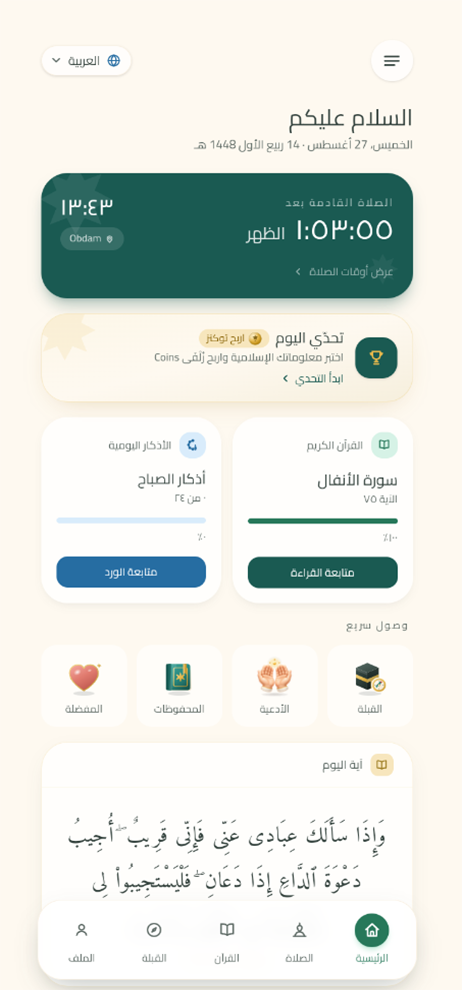
The ZULFAA home screen: the next prayer countdown, today's challenge, Qur'an progress and the verse of the day.
The home screen in ZULFAA 1.0.0. Shown in the app's Arabic interface.

What the first ZULFAA contained

Qur'an

  • The Qur'an, with its translation and tafsirThe full text, an English translation built into the app, and tafsir within reach while you read.
  • The Qur'an player on the home screenRecitation keeps playing when you leave the app, moves on to the next surah by itself, and the home screen shows how far you have read.

Prayer

  • Prayer times, worked out on your deviceThe five daily prayers, calculated on the phone itself from where you are, with the adhan and reminders. When ZULFAA has no location it says so rather than showing times for somewhere else.
  • The qibla compassThe direction of the Ka'bah, following the phone's sensors as you turn.

Daily Challenge

  • The Daily ChallengeA question a day, the tokens it awards and the honour board beside it.

Profile & Settings

  • Your own spaceA profile, and the settings that go with it.

Across the app

  • A home screen that knows your dayThe next prayer, today's challenge, where you had reached in the Qur'an and the verse of the day, all reading from the same place as the rest of the app.
  • The openingZULFAA opens with the muqarnas sequence rather than with a blank screen.
  • Room on a tabletThe screens lay themselves out for a larger display instead of stretching a phone layout across it.
  • A link to shareOne public address to send ZULFAA to someone.

Worth knowing

What you need

This release was a closed test

1.0.0 went to a closed testing track of about sixteen invited testers. It has never been on Google Play's public listing.

Your data

The Privacy Policy is one document

What the app shows you and what this website publishes are the same text, from the same source.

How versions work

The version number on this page is the one your device shows under Profile. A release appears here only once it has actually been distributed; anything still to come is marked as such and carries no date.

Found something wrong? Tell us on the support page. Support